A modern hosting control panel

Your websites. Your servers. Your control.

Harbor brings websites, email, DNS, databases, backups and security for your Linux server into one streamlined control panel that explains itself in plain language.

  • Installs on Ubuntu 24.04, 22.04 or Debian 12
  • nginx, PHP-FPM, MariaDB, Postfix, BIND
  • No licence keys
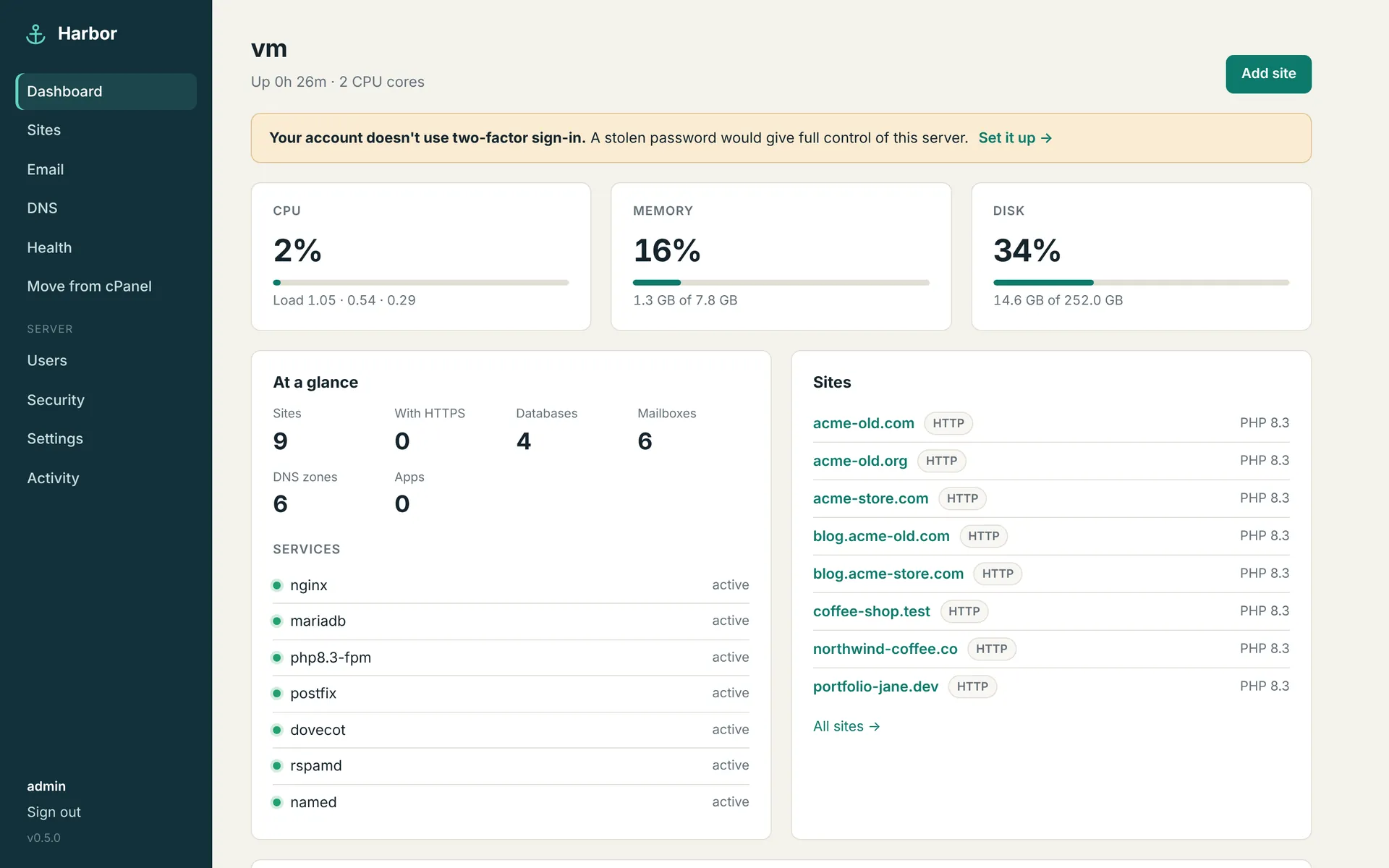
Harbor dashboard: CPU, memory and disk use, counts of sites, databases and mailboxes, the status of nginx, MariaDB, PHP-FPM, Postfix, Dovecot, Rspamd and BIND, and a list of sites.
The Harbor 0.5 dashboard on a test server with example sites.

One panel for the whole server

Every screen below is the real Harbor interface, captured from a test server. It follows your system's light or dark setting.

Every site is its own little server

A site gets a Linux user, a web root, its own PHP service and nginx configuration. The overview shows its folders, database and cron counts, live PHP memory, and the CPU, memory and process limits you set for it.

Site overview with details, HTTPS, domain aliases and resource limits for northwind-coffee.co.

Built for the jobs that usually take an afternoon

Three things Harbor does that make the day-to-day of running a server shorter.

Deploy from Git

Push to a branch and the site updates. A failed build changes nothing.

Harbor fetches the branch, runs your build as the site's own Linux user, then copies the result into the live folder while keeping the paths you protect, like uploads and .env.

  • Works with GitHub, GitLab, Gitea and Bitbucket. Private repositories use a deploy key Harbor creates for each site.
  • Push webhook with signature checks, and an API call for CI pipelines.
  • The first deploy backs up the existing site. Any earlier deploy can be put back with one click.
Deploy history with a live and a failed deploy.

Move from cPanel

One backup file in. Sites, mail and DNS out, with their passwords.

Upload a full cPanel account backup, paste a link to it, or copy it to the server. Harbor reads it, shows a plan you can adjust, then imports everything you ticked.

  • Main, addon, sub and parked domains, with /home/user paths rewritten in config files.
  • Databases keep their users' passwords, so WordPress connects without changes.
  • Mailboxes keep their passwords, folders and read state; forwarders, catch-all and autoresponders follow.
  • The old account is never touched, so you can switch DNS when you're ready.
cPanel import result with counts of imported sites, databases, mailboxes, zones and cron jobs.

Health

When something is wrong, Harbor names it and tells you the fix.

The checks look at what the rest of the internet sees: where your domains point, whether mail can arrive and leave, and whether the server is set up safely.

  • Domains pointing elsewhere, MX records that don't match your mailboxes, SPF, DKIM and DMARC.
  • Reverse DNS, a blocked outgoing mail port, spam blocklists and certificate expiry.
  • Slow or failing home pages, PHP errors, and missing two-factor sign-in, backups or alerts.
Health checks with problems and fixes.

Coming from cPanel? Here's where things are.

The cPanel features people use most, and what each one is called in Harbor.

Websites

Domains, Addon, Subdomains
Sites, each with its own Linux user, PHP service and nginx config
SSL/TLS
Free Let's Encrypt certificates that renew automatically
MultiPHP Manager, INI Editor
PHP version and settings per site
Application Manager
One-click WordPress, plus three Site Publisher templates
Git Version Control
The Deploy tab

Email

Email Accounts
Mailboxes with quotas, usage and suspension
Forwarders, Default Address
Forwarders and catch-all
Autoresponders
Vacation replies with date range and interval
Email Deliverability
DKIM signing set up automatically, records published or shown
Webmail
Roundcube on port 2096

Domains and DNS

Zone Editor
DNS zones served by BIND on the same server
Dynamic DNS
Per-host update keys
Redirects
Exact or whole-path redirects, 301 or 302

Files and data

File Manager
Browse, upload, edit, rename and download, locked to the site
FTP Accounts
SFTP per site, confined to the site folder
MySQL Databases
Database and user in one click
phpMyAdmin
Adminer opens signed in to one database, with a temporary login that expires
Backup Wizard
Full and scheduled backups, restore, offsite copies to S3-compatible storage

Security

Two-factor authentication
Authenticator codes and recovery codes, can be required for all admins
cPHulk
fail2ban for SSH, panel, mail, webmail and protected folders
ModSecurity
OWASP Core Rule Set per site: off, detect only or block
IP Blocker, Hotlink, Directory Privacy
All three, per site

Running the server

Metrics
Visitors, page views and bandwidth per site
Resource limits
CPU, memory and PHP processes per site, enforced by systemd
Notifications
Alerts by email or webhook (Slack, Discord, ntfy)
Team users, API Tokens
Per-site access for team members and a JSON API
Transfer Tool
Move from cPanel
Update Preferences
New releases announced in the panel and by email; update in one click

Why Harbor

Harbor is for people who run their own server and want the convenience of a panel without giving up a clear view of what it does.

Sites are kept apart

Every site runs PHP as its own Linux user in its own service, with open_basedir and kernel-enforced CPU, memory and process limits. One busy or compromised site can't take the others down with it.

systemctl status harbor-php-site1

Changes are checked before they apply

Every nginx, PHP-FPM, BIND and Postfix change is validated and rolled back if the service rejects it. Harbor tells you when a new version is out and updates in one click; it saves the current version first and goes back to it on its own if the new one doesn't start.

nginx -t · php-fpm -t · named-checkzone · postmap

Plain language, on every screen

Errors say what happened and how to fix it. The Health page turns DNS records, mail headers and service states into findings you can act on without looking anything up.

"Email is on here, but mail goes elsewhere"

Your server, your files

Harbor installs on your own VPS with one script and keeps everything in readable places: sites under /srv/harbor, generated configs next to the services that use them, and the panel's state in one SQLite file.

/srv/harbor/sites/<domain>/{public,logs,tmp}

From a fresh server to your first site

The installer sets up the web, mail and DNS services and the panel itself. Re-running it later upgrades Harbor in place and keeps your data.

  1. Start with a fresh VPS

    Ubuntu 24.04, 22.04 or Debian 12. Point a host name such as server1.example.com at it.

  2. Run the installer

    Get Harbor from the repository, then in its folder:

    sudo ./install.sh \
      --hostname server1.example.com \
      --email you@example.com
  3. Sign in to the panel

    Open https://SERVER-IP:8443 with the printed password. In Settings, confirm the host name and get a trusted certificate.

  4. Add sites or bring them over

    Create a site, connect a Git repository, or move an account from cPanel. Then turn on two-factor sign-in, offsite backups and alerts.

What runs under the hood

Harbor configures well-known open-source services and manages them for you. You can always log in over SSH and see exactly what it did.

Services Harbor sets up

  • Webnginx, PHP-FPM per site, Let's Encrypt (certbot)
  • DatabasesMariaDB
  • MailPostfix, Dovecot, Rspamd with DKIM, Roundcube webmail
  • DNSBIND 9, authoritative only
  • ProtectionModSecurity v3 with the OWASP Core Rule Set, fail2ban
  • ApplicationsWP-CLI for WordPress, Git and rsync for deploys
  • The panelPython (FastAPI), server-rendered pages, SQLite, behind nginx TLS

Automate it

A token from your account acts with your permissions. Sites, databases, backups, mailboxes, DNS records and deploys are all available.

curl -H "Authorization: Bearer hbr_…" \
  https://server1.example.com:8443/api/v1/sites
curl -X POST -H "Authorization: Bearer hbr_…" \
  https://server1.example.com:8443/api/v1/sites/3/deploy

Ports

PortUsed for
80, 443Websites
8443Control panel
2096Webmail
25, 465, 587SMTP: inbound, submission over SSL and STARTTLS
993, 995IMAP and POP3 (143 and 110 too)
53DNS
22SSH and SFTP

Sign-in and permissions

  • AccountsAdmins manage everything; team users see only the sites they're given
  • Sign-inThrottled logins, two-factor codes, optional IP allowlist for the panel
  • SessionsSigned, Secure, HttpOnly, SameSite=Strict cookies; CSRF tokens on every form

Full details, including where every file lives, are in the documentation.

Put Harbor on your server

Read the installation guide, then run one script on a fresh VPS. The source code is on GitHub.

Read the installation guide View the repository

Moving from cPanel? Start with Moving from cPanel in the docs.